Vehicles & EV Charging
GridMind brings your electric vehicles into your energy ecosystem — monitoring their charging in real time and letting you schedule charging intelligently around solar production and TOU rates. Rather than treating your EV as a simple load, GridMind treats it as a flexible, schedulable asset that can be charged when power is cheapest or cleanest.
Multi-Vehicle Support
Pro Multi-vehicle support requires a Pro plan. Free users can monitor and control their primary vehicle.
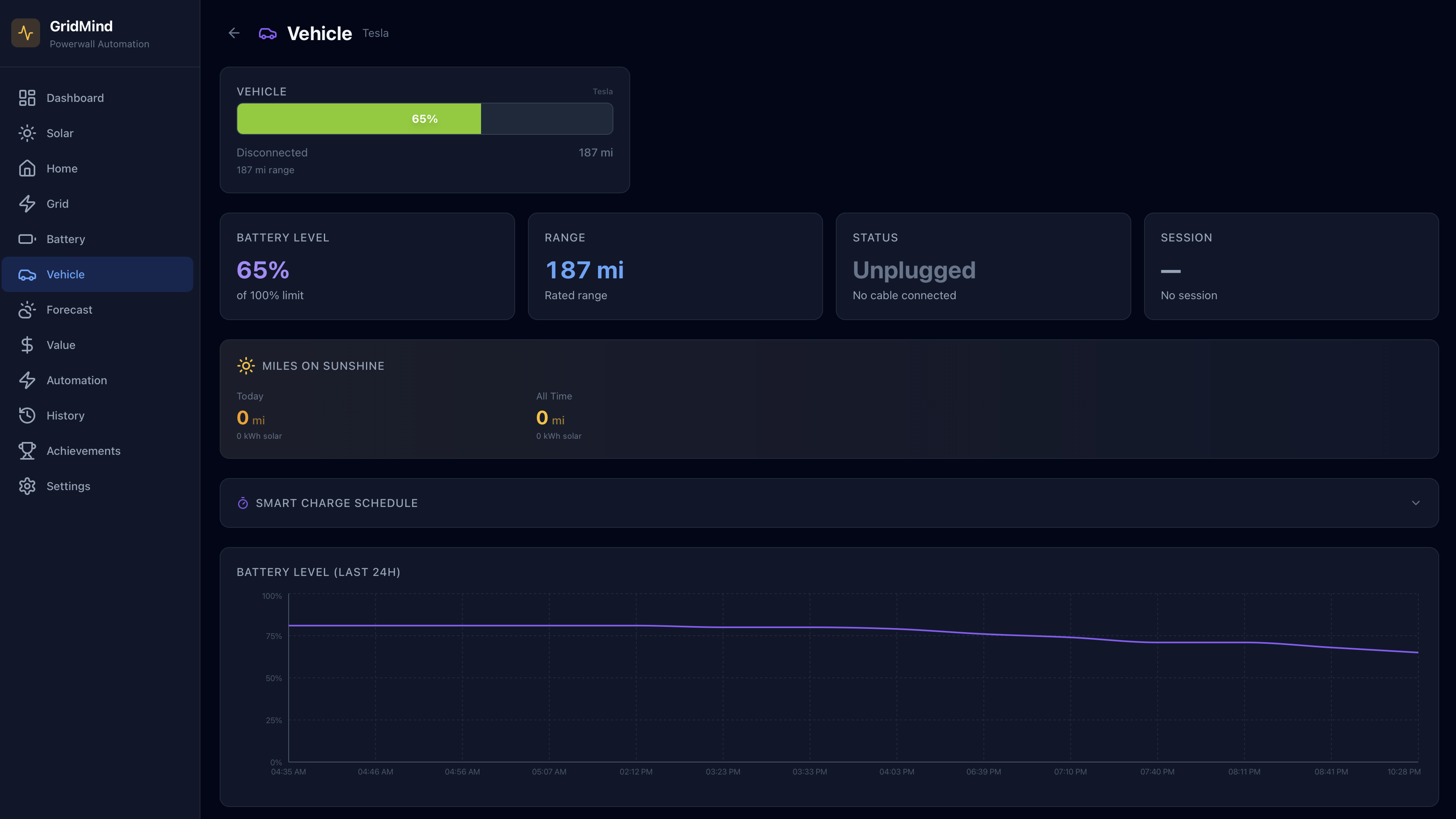
GridMind Pro supports up to 4 vehicles simultaneously across multiple vendors — Tesla, Hyundai, Ford, Rivian, GM, and more. Each vehicle has its own card showing:
- Vehicle name and model — pulled from your connected vehicle account
- Vendor icon and brand color — quick visual identification of each vehicle’s make
- Battery state of charge (SOC) % — current charge level
- Estimated range (miles/km) — based on current SOC and your vehicle’s EPA-rated range
- Current charging power (kW) — live power delivery from your charger, or 0 kW if not charging
On the main dashboard power flow diagram, each vehicle appears as a node on the left side of the diagram with individual power readings. On the iOS app, Pro users with multiple vehicles also see compact vehicle cards on the dashboard showing SOC, charging state, and power — tap any card to jump directly to that vehicle’s detail view.
Vehicle Selection
Use the vehicle switcher at the top of the Vehicles page to select which vehicle to view in detail. On the iOS app, this appears as a horizontal pill selector with vendor icons and brand colors. The detail view shows charge history, schedule configuration, and solar miles data for the selected vehicle. All vehicles remain visible in the summary card grid regardless of which is selected.
Cross-Vendor Capabilities
Different vehicle vendors support different features. GridMind automatically shows or hides controls based on what your vehicle supports:
| Capability | Tesla | Kia / Hyundai | Others |
|---|---|---|---|
| Monitoring (SOC, range, history) | Yes | Yes | Yes |
| Charge controls (start/stop) | Yes | Yes | Varies |
| Set charge limit | Yes | Yes | Varies |
| Smart charge modes (Off-Peak, Departure) | Yes | Coming soon | — |
| Solar-priority charging | Yes | — | — |
| Virtual key pairing | Yes | — | — |
GridMind’s charge mode selector only shows modes that your vehicle supports. As vendors expand their APIs, GridMind will unlock additional controls automatically.
Wall Connector Status
GridMind monitors your Tesla Wall Connector status without waking the vehicle, preserving battery charge during extended parking periods. Possible statuses:
- Disconnected — no vehicle is plugged into the connector
- Searching — a connector is plugged in but the vehicle hasn’t been identified yet
- Charging — the connector is actively delivering power to the vehicle
- Charge Complete — the vehicle has reached its charge limit or is fully charged
- Waiting — scheduled charging is active and the connector is waiting for its configured start time
- Fault — the connector has detected a hardware fault; contact Tesla support
Charge Controls
For supported vehicles, you can control charging directly from GridMind without opening the manufacturer’s app:
Start Charging — Begin charging immediately. If a managed charge mode (Off-Peak, Solar, or Departure) is active, GridMind will prompt you to confirm switching to Manual mode first.
Stop Charging — Pause charging immediately. The vehicle will not resume charging until you manually restart it or a schedule triggers.
Charge control commands wake your vehicle from sleep, which consumes a small amount of battery. Use wake commands sparingly if your vehicle is parked for extended periods such as airport parking or long vacations.
Tesla Vehicle Wake
The Wake Vehicle button sends a wake command via the Tesla Fleet API. The vehicle typically responds within 15–30 seconds, after which charge commands can be issued. Wake is required before issuing charge start, stop, or limit commands if the vehicle has gone to sleep. GridMind automatically checks whether the vehicle is awake before sending commands and will queue the command to execute immediately after a successful wake.
Last Charge Session
GridMind shows details of the most recently completed charge session for each vehicle:
- Start and end time — when charging began and ended
- Energy delivered (kWh) — total energy added to the vehicle battery during the session
- Starting SOC → Ending SOC — the charge level at the beginning and end of the session
- Duration — total time the vehicle was actively charging
- Source breakdown — estimated kWh charged from solar vs. kWh charged from the grid, based on your system’s solar production and battery state during the session
Charge Modes
GridMind’s charge mode selector lets you choose how your vehicle charges. Each mode shows only its relevant controls — no hidden settings or overlapping toggles. The modes available depend on your vehicle’s capabilities.
Manual
Set a charge limit and control charging yourself. Start and stop charging whenever you want.
Controls: Charge limit slider (50–100%)
Best for: One-off charging or when you want full manual control.
Off-Peak
Restricts charging to off-peak rate hours so you never accidentally charge during expensive peak hours. GridMind configures your vehicle’s scheduled charging to match your TOU schedule.
Controls: Charge limit slider (50–100%)
Best for: Daily drivers who want to minimize charging costs with overnight charging.
Solar
Prioritizes solar energy for charging. You set two limits: an “any source” limit (charges from grid or solar up to this level) and a “solar only” limit (charges only from solar surplus above this level). This lets you guarantee a minimum charge from any source while topping off with free solar energy during the day.
Controls:
- Dual-thumb slider — drag the grid thumb to set the any-source limit, and the solar thumb for the solar-only limit
- Off-peak only toggle — when enabled, any-source charging is restricted to off-peak hours
Best for: Users with solar who want to maximize self-consumption while ensuring a minimum charge level.
Departure
Charges your vehicle to a target SOC by a specific departure time, using the cheapest available power to get there.
Controls: Target SOC slider (50–100%) and departure time picker
Best for: Commuters who need a guaranteed charge level every morning at the lowest cost.
When you tap Start Charging while a managed mode (Off-Peak, Solar, or Departure) is active, GridMind will ask you to confirm switching to Manual mode. This prevents accidentally overriding your schedule.
Vehicle-to-Load (V2L)
Some vehicles — including certain Hyundai IONIQ 5/6 and Kia EV6 models — support Vehicle-to-Load, which allows the vehicle battery to discharge and power your home directly. When V2L is active and GridMind detects reverse power flow through a compatible adapter, the vehicle is displayed as a power source on the dashboard power flow diagram rather than a load. V2L energy contribution is tracked separately from battery and solar in the home consumption breakdown.
Solar Miles Tracking
GridMind tracks how many of your electric miles are powered by solar energy, giving you a concrete measure of your environmental impact:
- Solar miles — calculated as: kWh charged from solar × your vehicle’s efficiency (miles/kWh, sourced from EPA ratings)
- Running total — displayed on the vehicle detail page, accumulating from when you first connected your vehicle to GridMind
- Achievements integration — solar miles contribute to the Solar Miles achievement category, unlocking badges as you hit lifetime milestones
Pro Solar miles tracking and solar surplus charging require a Pro plan subscription.